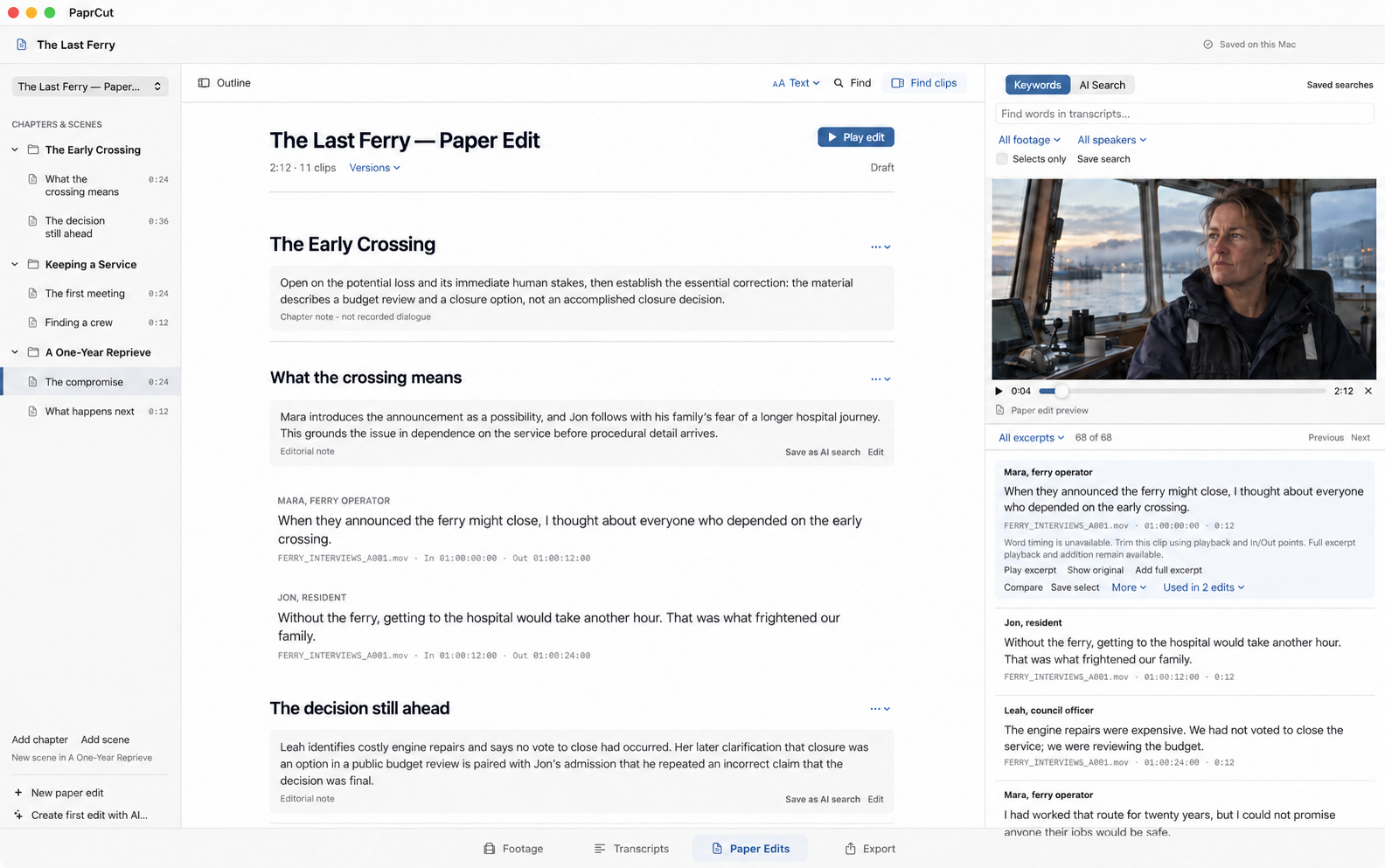
A paper-edit workspace for documentary and unscripted storytelling. Search interviews, shape chapters and scenes, then take an editable rough cut into Premiere Pro or DaVinci Resolve.
PaprCut / Paper Edits / Fictional demonstration project
On interview-led films, the work often starts with a question: what does this material actually support? The answer may be spread across people, recordings and days of shooting.
The paper-edit process on a film I directed for Square helped inspire PaprCut. I wanted to read the material together, work out the structure and hear the resulting edit, with every passage still attached to its recording.
My role Product direction, experience design, development and workflow testing.
How it works
From recorded material to a story you can edit.
01 / Footage
Bring the recordings.
Add local media and prepare searchable transcripts.
02 / Transcripts
Find the passages.
Search, compare, save selects and listen to the source.
Arrange recorded passages into a continuous paper edit. Play the selections in their new order, refine their In/Out points and try another structure without losing the earlier version.
The thinking behind the product
How I designed the editing workflow.
01
A line needs its context.
Rearranging words can change their meaning. Each selected passage keeps its source identity and In/Out points, so you can hear what came before and after it. Correcting transcript text changes the writing, never the recording.
You can check a promising line against the full interview before committing it to the edit.
02
Review an AI-proposed first edit.
Describe the film and PaprCut can propose a first edit from the available transcript and logged text, organized into chapters and scenes. Review the selected clips, duration and coverage gaps, then keep it as a separate edit to develop.
The AI works with text. Listening, assessing performance and deciding what the film means remain editorial work.
03
Continue the edit in Premiere or Resolve.
Premiere XML and Resolve OTIO carry the source cuts into an editable sequence for picture, sound and finishing. The editor can continue from the paper edit with the original media.
A Reading Copy supports discussion. A Team Copy gives another editor an independent project to develop with media relinked separately.
Where the media goes
Original video stays local.
Your project, transcripts, notes and original video remain on your Mac. Requested transcription sends prepared audio to the PaprCut service and OpenAI; requested AI tools send relevant text and instructions.
Use PaprCut on your project
Have a story you’re trying to find?
If you’re developing a documentary, docuseries or interview-led project and are interested in using PaprCut, get in touch. Tell me about the material and your editing workflow, and we can discuss access and whether it’s a useful fit.